
Account
Home/Account settings/Account
Create an account for an individual or legal entity
For individuals
1. To sign up for EVG Cloud Platform (ECP) services, go to our website and click the Create an Account button.

2. You will be redirected to the ECP ID account registration page.

3. Next, create an account using Google, GitHub, or your email account.

4. A registration confirmation link will be sent to the specified email address if you sign up using email. The link is only valid for 24 hours. If you do not see the registration confirmation email in your inbox, check your spam folder or resend the confirmation email.
5. Once you have confirmed your registration, you will be able to access your ECP dashboard.

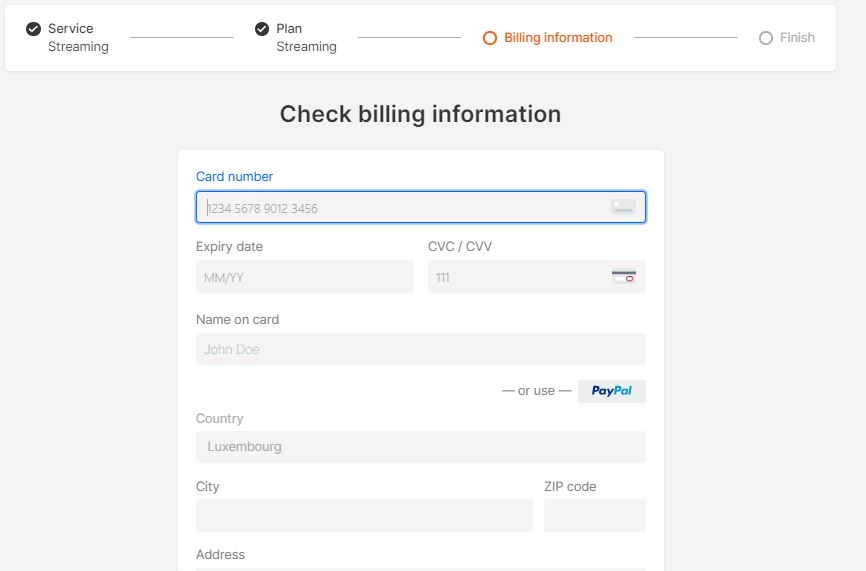
6. Choose the services you need by clicking Next. Then fill in your billing information details.
For legal entities
If you don’t need to sign a contract with us, you can just use the sign-up process for individuals and start using the services.
If you need to sign a contract, you can reach us via chat or email at [email protected]. We will ask the sales department to get in touch with you. You can still complete the sign-up process to gain access to the services while your contract is being prepared.
Last updated